


Digital Wedding Invitations: A Complete Beginner's Guide
⏱ Time needed: 10–15 minutes to read · about 10 minutes to make your first invitation
🎯 What you'll achieve: A clear understanding of how digital wedding invitations work — and how to create your own.
So you're engaged — congratulations! 🎉 Between venues, budgets, and family expectations, invitations can feel like one more overwhelming task. This guide breaks everything down: what a digital wedding invitation actually is, why so many couples are switching, and how to make one even if you have zero design skills.
What Is a Digital Wedding Invitation?
A digital wedding invitation is an invitation that lives on a web page instead of paper. Instead of printing and hand-delivering cards, you get a link (for example inv.kuundang.id/your-names) that you share with your guests on WhatsApp, SMS, email, or social media.
When a guest opens the link, they see a beautiful, animated invitation — usually with:
- 📖 The couple's story and event details (akad/ceremony & reception times)
- 🗺️ An embedded map with directions to the venue
- 📸 A photo gallery and background music
- ✅ An RSVP / attendance confirmation button
- 🎁 A digital gift or "wedding fund" section, if you choose
Everything updates instantly. Change the venue or time, and every guest who opens your link afterwards sees the new details — no reprinting.
Why Couples Choose Digital
| Digital | Printed | |
|---|---|---|
| Cost | Free to a few dollars total | Printing + delivery for every guest |
| Time to create | 10–20 minutes | Days to weeks |
| Edits after sending | Instant | Start over |
| RSVP tracking | Automatic, real-time | Manual tallying |
| Delivery | One tap to hundreds of guests | Envelopes, stamps, hand-outs |
That said, many couples still print a small batch for grandparents or formal family — digital and paper work well as a team. (See our digital vs. printed comparison.)
How It Works: 5 Steps
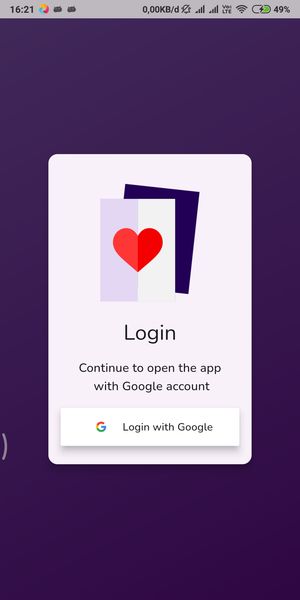
Step 1: Sign In
Download the app and sign in with your Google account — no lengthy registration forms.
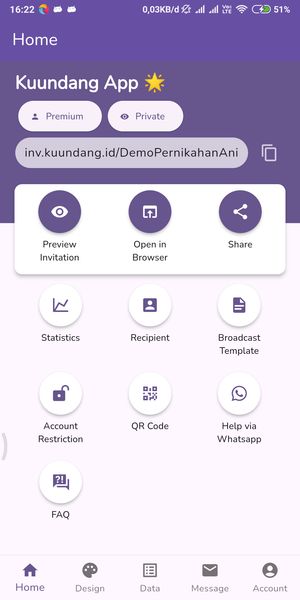
Step 2: Create Your Invitation and Choose Your Link
One tap creates your invitation and your unique URL. This link is what guests will open, so pick something memorable — usually the couple's names.
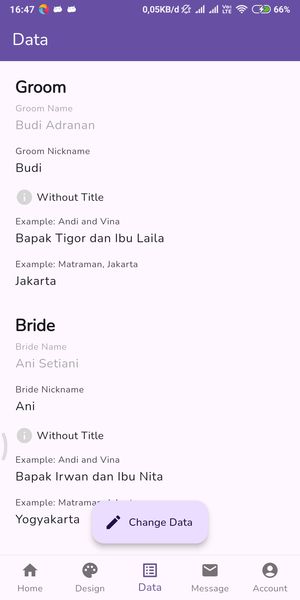
Step 3: Fill In the Couple and Event Data
Names, nicknames, both parents' names, ceremony and reception dates, times, and venues. Take this from your planning list, not from memory — accuracy matters here.
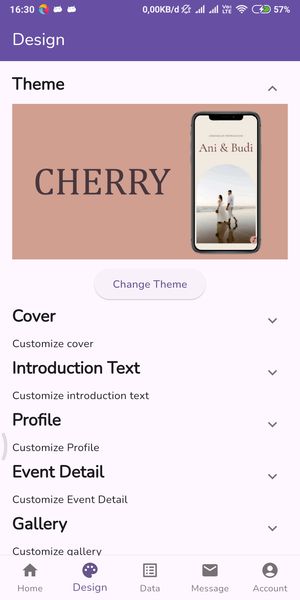
Step 4: Pick a Theme and Add Photos
Browse the theme gallery, choose the style that matches your wedding, then upload your couple photos and background music. No design skills needed — every theme is already laid out by designers.
Step 5: Preview and Share
Open a preview, check it on your phone (and one other device if you can), then hit Share. Send it individually to family and use broadcast lists for bigger groups.
What Your Guests Need
Nothing. No app to download, no account to create — your invitation opens in any browser, on any phone. Guests simply read the details and tap the confirmation button to RSVP.
Frequently Asked Questions
Is it free? You can create a complete invitation for free. Premium features — more themes, music, digital gifts, recipient lists — unlock as upgrades.
Can I edit it after sending? Yes. Update anything at any time; guests always see the latest version.
Is my invitation private? Your link isn't indexed or searchable — only people you send it to can open it.
💡 Pro Tip
Create your invitation in the first week of planning — even before everything is final. Use the date and venue placeholders and polish later. You'll be shocked how many conversations with family ("When? Where? Who's invited?") suddenly get easier once there's something real to share.
🔧 Stuck? Try This
| Problem | Quick Fix |
|---|---|
| The link looks too long or generic | Rename your invitation path to the couple's names before publishing |
| Photos look cropped | Use portrait photos for the profile sections — the app recommends vertical framing |
| Guests say the page didn't load | Ask them to open the link in Chrome/Safari and check their connection |
📖 What to Read Next
- ➡️ Just Engaged? Your First 7 Days Wedding Planning Checklist
- ➡️ 5 Things to Decide Before Creating Your Digital Invitation
✨ Ready to create yours?
Make your free digital wedding invitation in 10 minutes — download Kuundang on Google Play →